
Auto-scheduling and Rescheduling
Let Sunsama find time on your calendar for a task, and move your working sessions when plans change.
Auto-scheduling finds time on your calendar for a task so you don’t have to. Auto-rescheduling moves your working sessions when you add a conflicting one or finish a task early, so you only have one thing to work on at a time.
Auto-schedule a task
Hover over a task, or click it, and press X. You can also right-click it and choose Add to calendar. Press Cmd + Z (Ctrl + Z on Windows) to undo.
- If the task already has dotted projection blocks on that day,
Xturns those blocks into working sessions. - Otherwise Sunsama finds a free spot on that day. On today, it never picks a time that has already passed.
- The working session is as long as the task’s remaining planned time, or your default duration if it has none.
Set your working hours
Sunsama only schedules tasks inside your working hours unless you tell it to. Set them in Settings > Schedule:
- Default schedule: a start and end time for each day of the week, or Unavailable. The default is 9:00 AM to 5:00 PM every day, including weekends.
- Custom schedule per-channel: click Add a custom schedule for a channel to give a channel its own hours, for example evenings for side projects. This replaces your default hours for tasks in that channel.
- One day only: drag the Start and End lines on the calendar for today or a future day.
How Sunsama picks a time
- It schedules around events that block time, and around your other working sessions. Declined events, events marked free or available, all-day events, and events on a Non-blocking for tasks calendar don’t count. See Calendars for timeboxing.
- It only considers events on the day you’re scheduling, so make sure the day is in view.
- Auto-scheduling gap in Settings > Account > Timeboxing leaves None, 5, 10 or 15 minutes after each meeting and working session. The default is none.
- Tasks of 1 hour or less are split only if they have to be. Longer tasks are split to fill the gaps available, into at most three blocks. Hold
Shiftand pressXto keep a task in one block. - A recurring task with an At roughly time is scheduled at that time when it’s free. Otherwise it goes as close as possible, without using a time that has passed. See Recurring tasks.
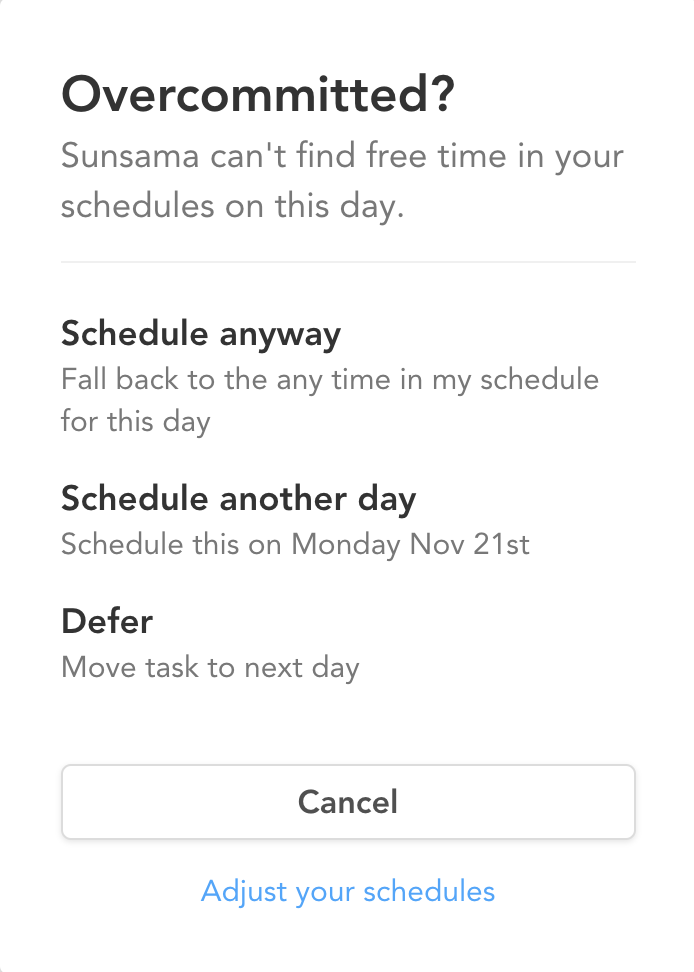
Overcommitted?
If there’s no free time for the task on that day, an Overcommitted? window offers:
- Schedule anyway: schedules the task outside your working hours.
- Schedule another day: finds the next day with room, up to a month ahead.
- Defer: moves the task to tomorrow without scheduling it.
- Cancel
Auto-rescheduling
Auto-rescheduling moves only your own working sessions. Meetings and other calendar events are never moved, and past days are left alone. It happens in two situations:
- A conflict. You drag, move or resize a working session so it overlaps another one. Sunsama moves the other tasks to the next free time, splitting them if needed. A task that can’t fit is taken off the calendar, but stays on your task list.
- A task finished early. When you complete a task before its session ends, the session ends then, and the working sessions that follow back to back move forward to fill the time. Sunsama stops at the first gap of 30 minutes or more, because it treats what comes after as a separate block.
A message tells you which tasks moved, with an Undo button.
Auto-rescheduling doesn’t run when you use X or Pin to calendar, since those already pick free time.
Control it
- Skip it once: hold
Shiftwhile you drop, move or resize a working session. - Undo it: press
Cmd+Z(Ctrl+Z). Your own change stays, and only the changes to other tasks are reverted. - Turn it off: in Settings > Account > Timeboxing, turn off Auto-reschedule tasks when they conflict or Auto-reschedule when a task is completed ahead of schedule. Both are on by default, and you can turn them off separately.
Settings
These are in Settings > Account > Timeboxing:
- Default duration when scheduling tasks: 15, 30, 45 or 60 minutes. A task’s planned time takes priority. The default is 30.
- Auto-scheduling gap: the breathing room Sunsama leaves between items.
- Auto-reschedule settings, described above.
- Rigid recurring task scheduling by default: keeps a recurring task at its At roughly time as closely as possible.